
Created 01/23/2026
Proudly WEB 1.0 (with CSS)
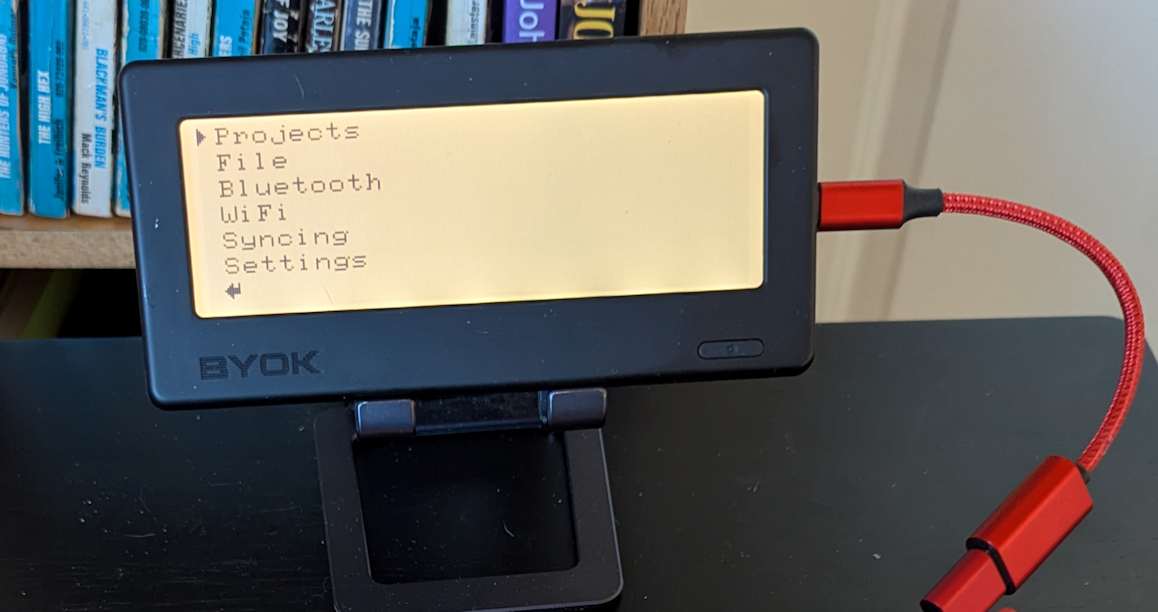
The BYOK is both really wonderful and, in a really odd way, there isn't much to say about it. It is the classic example, and a very good one, of a simple tool that does just one thing and does it as well as anything could. It is a writing deck that fits in your hand, but needs to be connected via USB or BT to a keyboard before it becomes a true digital typewriter. In other words, it becomes a Writer Deck with the best possible keyboard for you, because you pick it out (most work, a few are exceptions). The screen is a monochrome LCD with adjustable backlight that, with a stand, can be placed at almost any viewing angle. The BYOK can be held by the stand or you can use a magnetic mount on the back of the BYOK. All you need is a keyboard and a stand and you are ready to write.
You start out with a text menu. You have to first create a Project before you can create a file. A Project can be thought of as a kind of folder. Each folder can be associated with different writing projects, different chapters of the same manuscript, however you like. Then you create files under a project. The editor is just for drafting words. There is no fancy formatting, no copy and paste. This company is new, so I wouldn't be surprised if that changes. The editor saves text as you type, there is no save command you have to use. You can connect a keyboard by USB or by Bluetooth (BT) pairing. You can even use an Alphasmart Neo as your keyboard.
The BYOK has two ways of transferring files to your computer, one off line and one online. The offline method is to connect the BYOK via USB cable to your computer and put it into disk mode. Your Micro SD on the BYOK will appear as an external drive on your computer and you can copy files. You can also just remove the Micro SD card from the BYOK and put it in a card reader for your computer, but Disk Mode is easier. The other method is syncing over WIFI to BYOK's web app called Studio. Although the more extensive web tools of Studio require a subscription, syncing text files and being able to edit those text files is free. The fact that BYOK requires files to be organized into Project folders is in deference to Studio. For syncing purposes, Studio works well, but is not as intuitive as it could be.
I'm not going to evaluate the Studio Web Tools here simply because I'm so far not tempted to use them myself, which puts me in a poor position to form an opinion about them. It doesn't mean they are bad. I don't use Scrivener, but I don't think that means it's bad software, just that it doesn't work for my flow. For me, disk mode to my Dropbox folders on my computer will get my writing to my various devices. They would probably have to make Studio a desktop app before I would want to use it. Let me note, however, in BYOK's favor, that there is no requirement to use the internet to back up your documents and there is no part of the BYOK capability that you need to access their servers for. Even firmware updates can be downloaded and moved to your Micro SD card.
The BYOK is a nice piece of hardware. It's solid, slick, not 3-D printed. Just a black or white rectangle with a 5.5" (diagonal) monochrome LCD screen. On the front is a power button. On the back are four rubbery buttons that can be used to adjust the backlight, move the cursor up and down and press enter when no keyboard is attached. There is also a magnetic ring that fits on the back for magnetic stands. The magnetic ring has an inner ring that can fold out and provide a kickstand. The screen has a bit of light bleed along the bottom, even at lower brightness levels and the fonts are a little ugly and letters aren't always sharp. I think particularly the font issue will likely get addressed in future firmware upgrades. Again, this is the first iteration from a new company that has never pulled together a tech manufacturing project before. They did a pretty good job and managed to actually get it made and delivered to their backers. They deserve kudos for that. And, it comes in at under $200. The BYOK certainly is worth consideration! I wish them success.
|
BYOK Device Home where you can find information and purchase. |
|
|
An online Quick Start and User Manual for the BYOK |
|
|
Information on BYOK's Studio Writing Platform. It offers a free trial. Keep in mind that syncing files created on your BYOK to Studio and using Studio's online text editor are always free, although they do require creating an account. |
|
|
There are several people on this forum I frequent that have and discuss the BYOK. I am H0ok there. Feel free to ask questions and we'll try to help. |
All content © 2026 Hook Mountain Studios, except where other authorship or sources are indicated.
If you would like to contact me, you can either find me on the Alphasmart-Writing Tools Forum on Flickr or you can Email me.