
Updated 12/14/2025
Proudly WEB 1.0 (with CSS)
All Micro Journal models are designed and hand crafted by Un Kyu Lee. This site represents my own views and I in no official way represent Un Kyu Lee. So, opinions and mistakes here are mine and mine alone. I just truly appreciate these great machines.
Official links to where you can buy the Micro Journal Rev 2.1 and Un Kyu's own setup pages are linked below.
The Micro Journal Rev 2.1 is a Linux-based (Raspberry Pi running a version of Debian) Writer Deck for reduced distraction writing and editing. The first and most important point is that, for someone who just wants to use it as a writer deck, you really don't have to care that it runs on Linux and you will have very little reason to interact with Linux. The Rev 2.1 is first and foremost a Writer Deck, not a Cyber Deck. I will concentrate on that aspect of it. But it is also a quite capable Cyberdeck if you want to go that way.
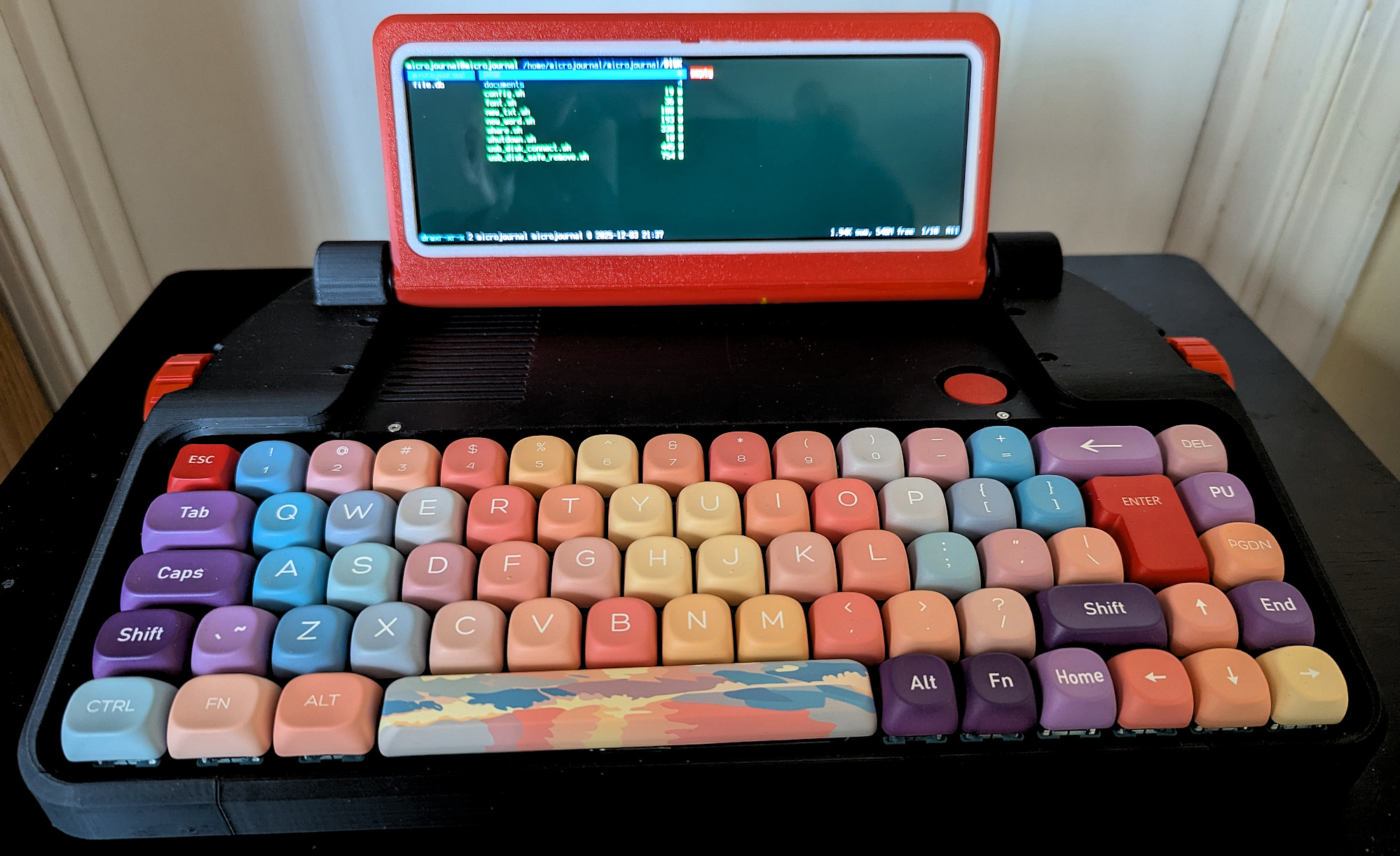
First, the design and hardware. The body is very similar to the Rev 7, a true digital typewriter with a full keyboard gently sloping up. There are two typewriter styled knobs, one on either side, that can be used to control cursor movement; up and down line-by-line (right) and sideways back and forth (left). The screen is exquisite. It is, hands down, the best screen on any Micro Journal, a sharp, clear color LCD (8" diagonal, landscape) with good enough resolution that the default font size is small but quite readable. I installed 4 batteries. You don't have to install the 4th battery, it is a bit more of a bother (you have to remove the screws on the left side of the Micro Journal and pull away the left side of the body to get access, but it isn't really difficult). I have not tested battery life yet using the 4 batteries, but it is definitely hours. You can also run it with fewer batteries or no internal batteries. Just plug in an external battery or AC adapter. The keyboard is the same writers keyboard the Rev 4 and Rev 7 have. No F-Keys (they are available on another Key Map layer for Cyberdeck use), no numpad. Very little for me to change, other than disabling Caps Lock. It uses Vial for changing the Key Map. This really seems to represent, hardware-wise, a sleek melding of some of the best features of other Micro Journals into an elegant new design.
The Rev 2.1 is easy to set up, but I will leave that to Un Kyu's Quick Start Guide linked below. It is not instant on because you are booting into Linux first. This is a terminal version of Linux, so there is no desktop GUI. Like the Rev 2, The Rev 2.1 boots into ranger. Although ranger is actually a sophisticated file manager, it is cleverly set up as a launcher. The thing you discover as you go along is that every aspect of the software setup on the Rev 2.1 is just smoother and simpler than the Rev 2 ever was. Un Kyu clearly took the lessons learned from the rev 2 and really thought out how to make things better.
The launcher menu presents the following choices:Documents The folder where all your files are kept, config.sh A script that launches the Raspberry Pi config tool, font.sh A script for changing font size/screen resolution, new_txt.sh A script that opens a new file in the default text editor called Micro, new_word.sh A script that opens a new file in the default terminal word processor Wordgrinder, share.sh A script that sets up being able to use the browser on your computer as a file manager to download/upload files to/from your computer, shutdown.sh A script used to properly shut down Linux before switching off the Rev 2.1, usb_disk_connect.sh A script to mount external USB thumb drive, and usb_disk_safe_remove.sh A script to safely eject (unmount) the USB storage.
Notice that, unlike the Rev 2, you have two default editors set up, Wordgrinder and Micro. Wordgrinder is pretty powerful terminal editor with a menu driven word processor capabilities. Wordgrinder is also available for most platforms, including Windows. The only downside is that it uses a proprietary file format that has to be exported to plain text in order to use it outside of Wordgrinder. Micro is a plain text editor with a lot of great features and keyboard short-cut bindings. It is quite easy to use if you are happy with the default setup and bindings, but does have a bit of a learning curve if you want to make changes and are unfamiliar with Linux style terminal text editors.
The Rev 2.1 also fixes the one limitation the Rev 2 had. The Rev 2 was not set up to keep the network running, resulting in it being hard to have accurate date/time data. This was largely a move to conserve power with only one battery (and I don't think it was changed when the battery was removed in later models). The Rev 2.1 now turns on the network at boot and keeps it on with time and date updating within a few seconds after boot.
As you can see, The Rev 2.1 is a very impressive refinement of the Rev 2, but there is also a killer new feature: A USB port in the back that allows you to use an external thumb drive to download and upload files. When mounted, a new folder appears on the Launcher called "DISK." You can select a file in the documents folder, type "y-y" to copy, then move to the DISK folder and type "p-p" to paste. This makes it very easy to back up files when you are away from your computer.
The Rev 2.1 (or Danix, as I call it) is the true successor for the Alphasmart Dana in every aspect. And it has so simplified and refined everything from the Rev 2 that it is something that someone who has never even heard of Linux can pick up and use as a Writer Deck out of the box. Just like the Dana, where you could ignore Palm OS and jump immediately into Alphaword. Of course, Palm OS did provide a graphical Desktop, but in the absence of a graphical desktop for Linux, the ranger-based launcher does quite well. But like the Dana user who wanted to take advantage of powerful Palm OS capabilities, from calendar apps to databases and outlining tools, The Rev 2.1 is a capable Linux Cyberdeck if you want to explore those possibilities. I will document things that work for me in Linux from time to time. You can also find discussions by myself and several people on the Alphasmart-Writing Tools Forum (linked below).
The Rev 2.1 is now my primary Writer Deck. I can choose whether to use it for Drafting or for editing. This one does it all. I didn't think this would unseat my Rev 7. I do confess I will still use my Rev 7 from time to time... just because. ;-)
|
You need to understand that Un Kyu Lee not only designs all his Writer Decks, he also builds them by hand. Because both things take time and care, ordering is tricky. Watch the date for the next restock, but you have to act quickly as he will only put up as many as he thinks he can build in the next reasonable period of time. Be patient. It's worth it. There is also a lot of other good information on this page. |
|
|
Documentation of how to get going with your new Rev 2.1 The document is still evolving at this time, so you may want to recheck it periodically. I am currently working up a user guide that will be incorporated into this quick start guide as with other Micro Journal models. |
|
|
How to reflash the OS and set up the software if you ever need to. Likely you won't, but what a great resource to be given in case your SD card ever got fried. Everything on the Rev 2.1 is open source. |
|
|
Un Kyu Lee's YouTube page with informative and useful videos for all his different models, including the Rev 2.1. |
|
|
There are several people on this forum I frequent that have and discuss the Rev 2.1. I am H0ok there. Feel free to ask questions and we'll try to help. |
|
|
Hook's Key Map Guide For the Rev 2.1 (Coming Soon) |
A guide I am creating for very simple changes to your Rev 2.1 Key Map using Vial. Will post as soon as it is ready |
|
Hook's guide for making nano your default editor for Linux on the Rev 2.1 (Coming Soon) |
This will be a revision of the document I had for the Rev 2. In this case, I no longer need nano as an option for the launcher for drafting. Micro is fine. But I still want nano as my Linux default. |
|
Backing Up Files to Dropbox on the Rev 2.1 (Coming Soon) |
With the thumb drive capability available, I'm not sure I care as much about this, but I will test out that it works on the Rev 2.1 and update the document that I created for the Rev 2. |
All content © 2025 Hook Mountain Studios, except where other authorship or sources are indicated.
If you would like to contact me, you can either find me on the Alphasmart-Writing Tools Forum on Flickr or you can Email me.