
updated 04/07/2026
Proudly WEB 1.0 (with CSS)
All Micro Journal models are designed and hand crafted by Un Kyu Lee. This site represents my own views and I in no official way represent Un Kyu Lee. So, opinions and mistakes here are mine and mine alone. I just truly appreciate these great machines.
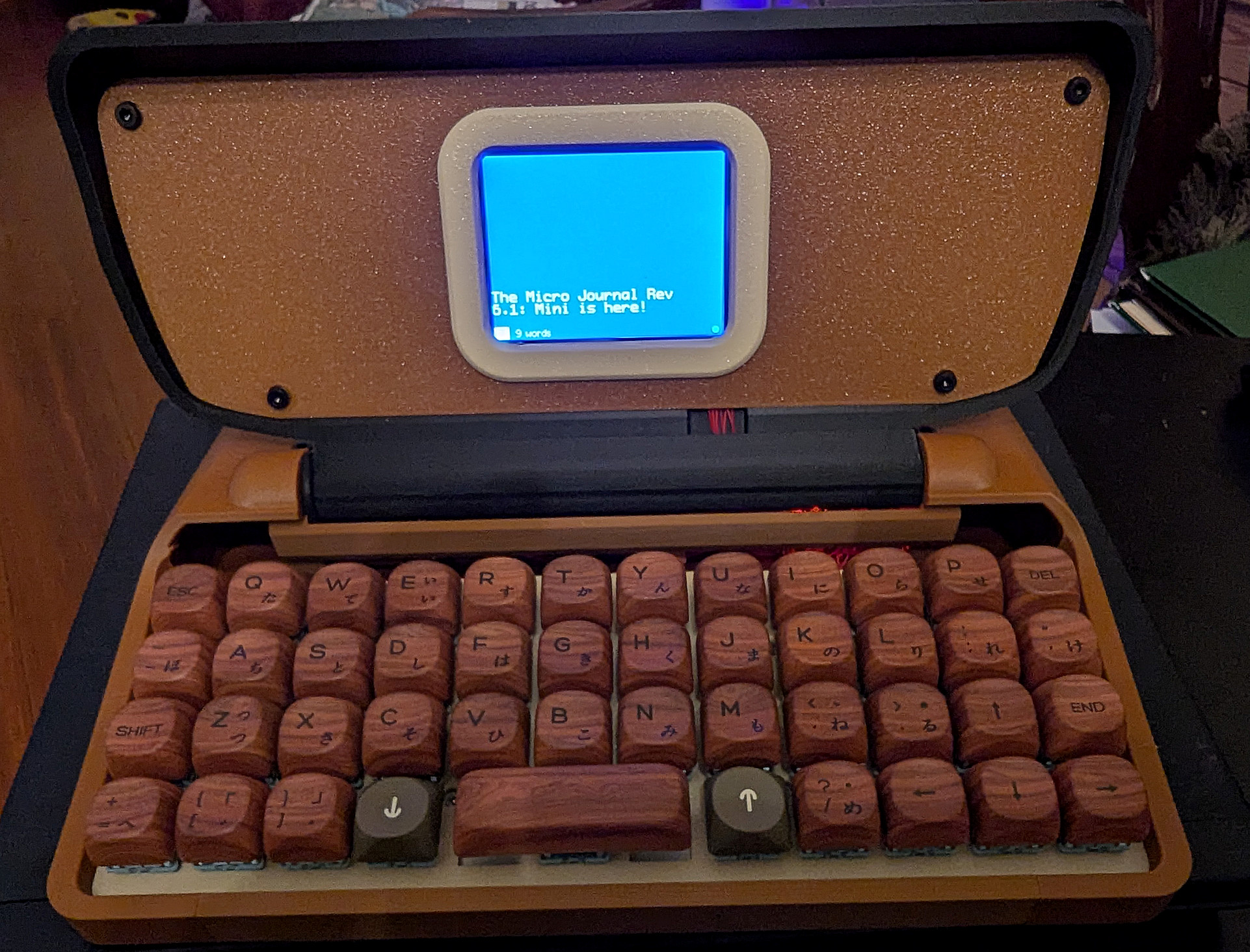
There really isn't a lot to say about the Rev 6.1: Mini other than to note it's remarkable design. Because that is the only difference between the Rev 6 and the Rev 6.1: Mini. The design is sleek and compact, folding up into a 9.8" by 7.8" clamshell that is about 3.1" thick and weighs less than 3 pounds. It is solid, portable and is very stable on your lap. It is instant on and it runs for up to 30 hours on one rechargeable 18650 Lithium battery. It is truly the perfect portable.
Other than that, you might as well go read my review of the Rev 6 because inside this sleek new design is a Rev 6. You use the Rev 6 User Guide and, if you already have a Rev 6, you can remove the SD card and insert it into this Rev 6.1: Mini and you are ready to go.
That's it. Nothing below here is anything new. It has been copied from my Rev 6 page. But the design is what makes this my absolute first choice when I need a more portable Writer Deck.
The Micro Journal Rev 6.1: Mini is a very simple, easy, distraction free and writing focused draft writing digital typewriter. It has a 48 key ortholinear keyboard with mechanical switches and a small but sufficient LCD screen. You only see a little of your text as you type, but you have full navigational capability to scroll back through your text if you need to. If you have never used an ortholinear keyboard before, it will take some getting used to, but I found I adapted to it pretty quickly. The mechanical keyboard makes it a pleasure to type and the switches have a nice clicky sound and feel. Key assignments are made via a text file called a json file. The file can make key assignments on six layers for each key using keypress, shift and "Lower" and "Raise" keys in different combinations. In addition, you have cursor movement key assignments for easy navigation and review of your text. Information about the json file is listed below.
The Rev 6.1: Mini's OS is very basic, whatever runs off the ESP32 SOC, so it has very focused functions and capabilities. Exactly what you want in a pure drafting digital typewriter. The setup page is linked below. When you turn the Rev 6.1: Mini on, you are immediately taken to the text editor, either a blank new file the first time you start it up or to whatever was the last file you were working in. You can just start typing. It saves after some few seconds with no activity or when you use Esc to go out to the menu. You can use navigation keys to scroll back and review what you have written when you need to. Luckily the screen is too small to encourage real editing. There is a limitation here. The Rev 6.1: Mini has a limited text buffer so it is possible to not be able to scroll all the way back if you are typing a longer piece. However, that is just the buffer--you are not losing any text. It is all safely in the file.
The ESC key will take you out to a menu. The menu has all the "file spaces" which you select by typing a number. Writing can be easily transferred to the computer. You can use a script to set up sync with Google Drive, or you can use a BLE connection to wirelessly pair your Rev 6.1: Mini to your computer or phone as a keyboard and use "Send" to type out your text. It really is easy, quick and reliable. I'm not going to go into great detail here, but the quick start guide linked below provides a detailed User guide.
The Rev 6.1: Mini does not have all of the features of the Alphasmart Neo 2 such as copy and paste and spell checking. If those are important, you should look at the Rev 2.1. But if simply getting your draft out without a lot of distractions and not worrying too much about editing typos, this is an ideal successor to the Neo 2. If you prefer a full staggered Qwerty keyboard, you might consider the Rev 7. However, if you are on a budget, or if your really need portability, the Rev 6.1: Mini is an outstanding choice.
|
You need to understand that Un Kyu Lee not only designs all his Writer Decks, he also builds them by hand. Because both things take time and care, ordering is tricky. Watch the date for the next restock, but you have to act quickly as he will only put up as many as he thinks he can build in the next reasonable period of time. Be patient. It's worth it. There is also a lot of other good information on this page. |
|
|
This "user Manual" for the Rev 6.1: Mini shows you how to install the battery (the only real difference between the Rev 6 and Rev 6.1: Mini)and then links you to the Quick Start Guide and User Guide for the Rev 6. This A fantastic and detailed documentation of how to get going with your new Rev 6.1: Mini. It now includes a user guide and detailed documentation of how to use the Json file to modify the Key Map |
|
|
Here is where you can watch for firmware updates for the Rev 6.1: Mini and all Un Kyu's other ESP32 devices (Not the Rev 2.1, which runs on Linux). |
|
|
A useful, little deeper dive into using the json text file to reassign keys on your key map for the Rev 6.1 Mini. This is the same quickstart guide linked above. This just jumps you right to the Key Map section. |
|
|
Un Kyu Lee's YouTube page with informative and useful videos for all his different models, including the Rev 6.1 Mini. |
|
|
There are several people on this forum I frequent that have and discuss Micro Journals. I am H0ok there. Feel free to ask questions and we'll try to help. |
All content © 2025-2026 Hook Mountain Studios, except where other authorship or sources are indicated.
If you would like to contact me, you can either find me on the Alphasmart-Writing Tools Forum on Flickr or you can Email me.