
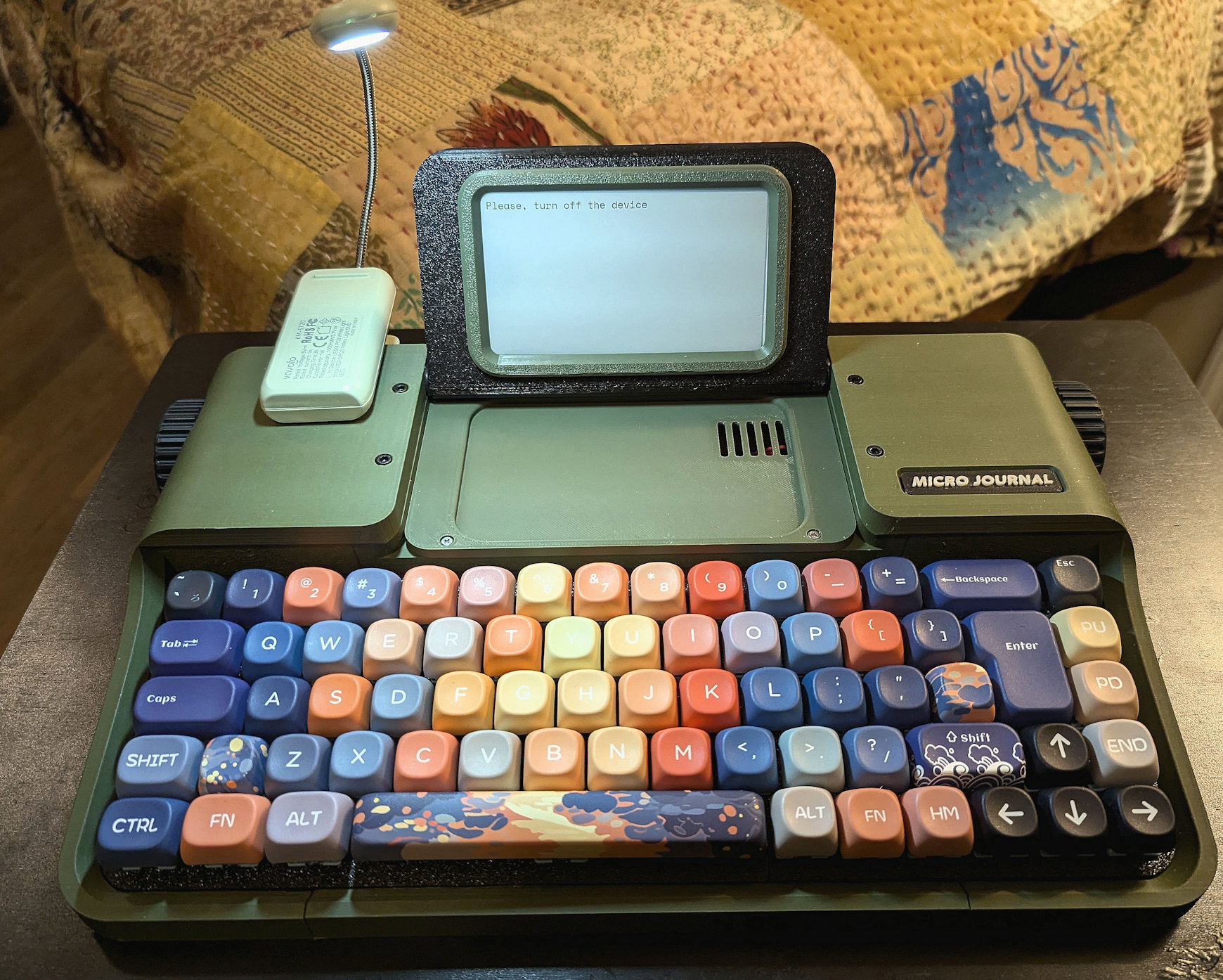
The key caps pictured have been added. They are not the key caps you get if your order includes key caps
Updated 07/24/2026
Proudly WEB 1.0 (with CSS)
All Micro Journal models are designed and hand crafted by Un Kyu Lee. This site represents my own views and I in no official way represent Un Kyu Lee. So, opinions and mistakes here are mine and mine alone. I just truly appreciate these great machines.
Bottom Line Up Front: this is a fantastic Neo Replacement. Part of that comes from the software. The software features include multiple file spaces, simple editor with navigation keys, and even a true Alphasmart style "Send" function. (there is also a function to back up to Google Drive using your network). However, these software features are shared with the Rev 6, so it is more than that that makes this a great choice for drafting.
Let me start with the design, because it is stunning. This is an elegant digital typewriter with gently sloping keyboard (rather than flat), a folding screen and even a place to properly clip a rechargeable booklight, which becomes actually part of the aesthetic of the device rather than a clumsy jury rig (to be clear, you supply the booklight, it doesn't come with). It is solid without being heavy and, with a full size mechanical keyboard, so comfortable to type on. The typewriter-like scroll wheels on the sides would be wonderful just as design elements, but either one will allow you to scroll up on your text. Being an ePaper display, it isn't line by line smooth scrolling as would happen on a real typewriter, but more like PgUp and PgDn jumps. Pushing in the right side scroll wheel refreshes the screen, pushing in the left scroll wheel refreshes the screen so you can turn the Rev 7 off without your writing being left on the screen. The SD card is inserted in a convenient port at the top of the screen.
Now to the ePaper screen. I think it's wonderful, but I want to be honest, it isn't perfect, though Un Kyu gets a lot out of it. There are delays, but they are very brief, only intermittent and mostly single character delays, not whole words. I find it mostly ignorable. It doesn't interfere with my drafting. However, I should also say, I'm not a touch typist. I don't know, if you type very fast and are fixed on watching the screen, if it is more bothersome. There is also ghosting that happens on the screen, below where you are writing. Again, I find it ignorable, or, if it gets a bit much, you can reset the screen instantly by pushing in the right scroll knob. It reflashes the screen and you carry on with your drafting. The font is a sans serif font with well-rounded elements a decent spacing between characters for easy readability at the 8 double spaced lines per screen size. There is no way to change font size/lines per screen. The text does not scroll line by line as you type. You start at the top and the lines fill down as you type. When you reach the bottom it does a PgDn jump and your last line is at the top. This is common to an ePaper displays as scrolling line by line would mean redrawing the whole screen with every new line. Adding the booklight, especially with adjustable settings is really helpful, even when there is enough natural illumination to read the screen. Like with real paper, a little light never hurts.
Battery life is very good on this model. It uses a single 18650 Lithium ion battery (3300 mAh max)that you install yourself. I have used this for hours at a time and usually still have 3 LEDs lit on the battery check in the back.
This is a bigger device than the other Micro Journals. When I sit it on my ThinkPad T570, it has the same footprint. For that reason, you may be less inclined to take it out with you. But if you have a good bag, you can. It is big because of the full size keyboard. What is really nice is Un Kyu gave the Rev 7 height as well, which allowed him to get a really nice slope on the keyboard rather than keeping it flat. That makes it so much more comfortable to type on. While it is bigger and the build quality is excellent, it is not heavy.
The Rev 7 uses the same software as the rest of Un Kyu Lee's other devices (except the Rev 2 series which are cyberdecks using Linux). The menu screen lists 10 numbered file spaces (0-9), plus being able to type D to empty the currently selected file space, W to set up WIFI, S for syncing the currently selected file space and B for back. When you select a file space, you have the Micro Journal simple editor. You type and it keeps track of the number of character (spaces are counted) at the bottom. It saves after x amount of time with no activity or when you use Esc to go out to the menu. And the editor allows infinite scrolling through the entire file. You can also use the Rev 7 as a BT keyboard which lets you SEND text to a computer or mobile device just like an Alphasmart Neo.
This truly is a great drafting device from a talented designer. The pure simplicity of the Rev 7, combined with a full keyboard, an ePaper screen and an inspired typewriter design just checks all the boxes. The build is very solid. A lot of work went into this Writer Deck. It is more than being distraction free. It draws you in. It makes you want to keep writing.
|
You need to understand that Un Kyu Lee not only designs all his Writer Decks, he also builds them by hand. Because both things take time and care, ordering is tricky. Watch the date for the next restock, but you have to act quickly as he will only put up as many as he thinks he can build in the next reasonable period of time. Be patient. It's worth it. There is also a lot of other good information on this page. |
|
|
The setup guide for your Rev 7. Clear instructions to get you going from Un Kyu Lee. This also incorporates a user guide I helped prepare for first time users |
|
|
Here is where you can watch for firmware updates for the Rev 5, 6 and 7. |
|
|
An excellent video demonstration of the Rev 7 by Un Kyu. It will let you see what the eInk screen looks like when typing on it. |
|
|
A thread at the Alphasmart - Writing Tools forum on Flickr. This is the best place to come and ask questions. You can generally find me on that forum. |
All content © 2025-2026 Hook Mountain Studios, except where other authorship or sources are indicated.
If you would like to contact me, you can either find me on the Alphasmart-Writing Tools Forum on Flickr or you can Email me.