
Created 01/23/2026
Proudly WEB 1.0 (with CSS)
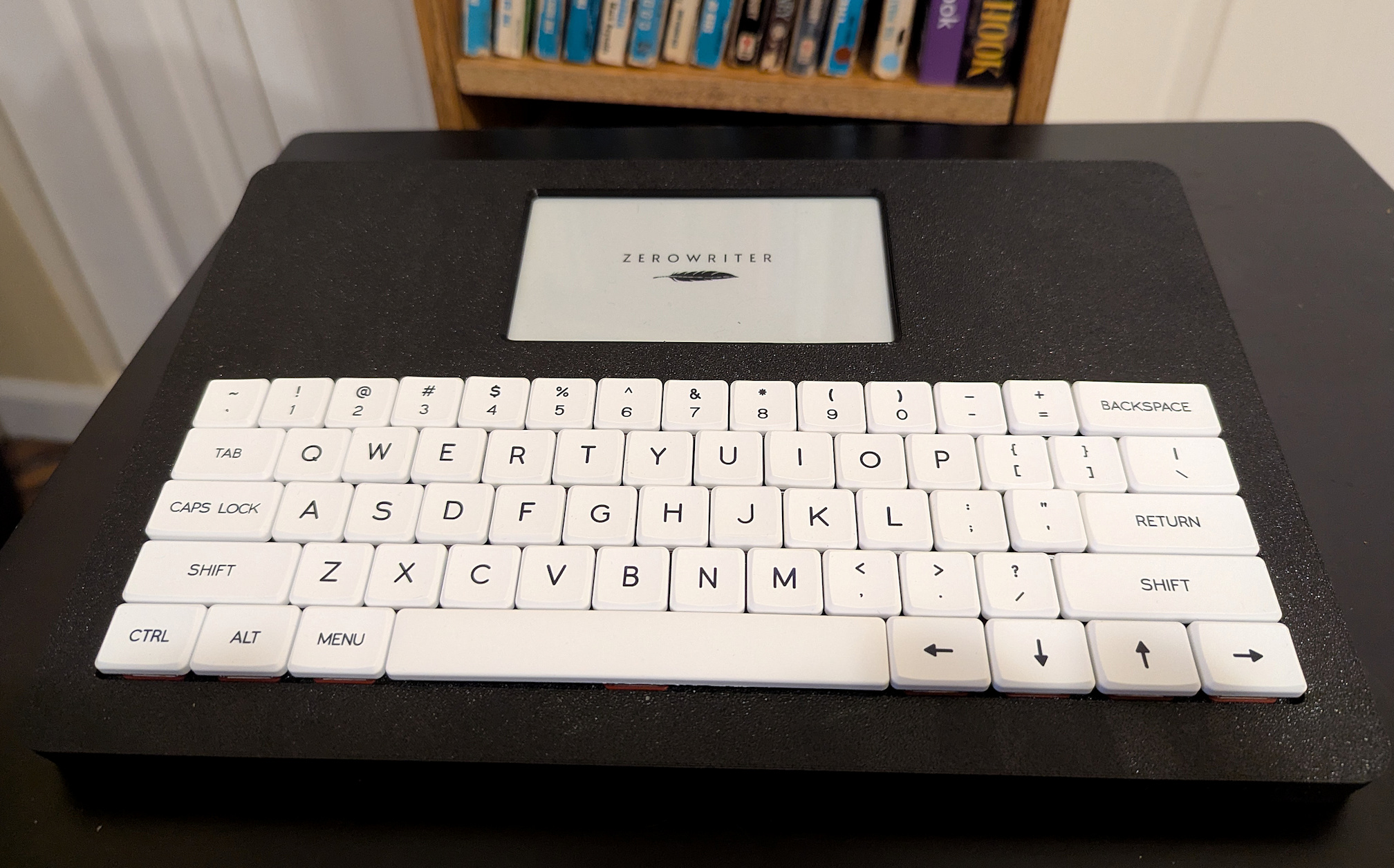
The Zerowriter Ink is a first attempt by a new company at mass producing an Alphasmart inspired Writer Deck. What is exciting right off the bat is that this is an effort to do this with everything open. The hardware is open and the software is all open source. The "company" is largely one man, but working with other companies in Canada and Croatia. It was crowdfunded in September of 2024 and has now finally landed. Is it perfect? A first product manufactured by a new company? Are you kidding? Of course not. But it is very very good and has great potential if they can keep it going through tariffs and other misfortunes of timing.
The Zerowriter is truly a Alphasmart Neo with a e-Paper screen. The screen is the shining gem of this Writer Deck. It is the best e-Paper/e-Ink screen I have ever seen for writing. It is sharp and clear and does a great job of keeping up with my typing. So far I've seen no ghosting or artifacts. It is even pretty fast when it has to redraw the screen, for instance, when changing to the menu or when doing a page down while typing (as is common with e-Ink type screens, it doesn't scroll line by line but instead does a page down when it reaches the bottom line on a screen-- scrolling requires too much screen redrawing). The screen is going to be a big selling point for this Writer Deck. It is stunning.
The keyboard is a low profile Pro Red Choc V1 mechanical keyboard. This is a good keyboard and typing on it is nice. I will say that the ZW's keyboard is marginally narrower than the Neo's keyboard, but it is a bit shorter vertically (not including the top row on the Neo). The result is a keyboard not quite as comfortable to my large hands as a Neo because of a compression of key spacing and low profile keys resulting in shallower sculpting and reduced travel. Keyboard evaluations are always to some degree subjective. YMMV. It is vastly superior to, for instance, the keyboard on the Pomera DM250. The keycaps are replaceable and you can use a json file to get different layouts like AZERTY, or DVORAK, etc.
The Zerowriter's design, like the Alphasmart Neo, is basic. It is a 3D printed flat rectangle, flatter than a Neo, though they incldue two stick-on risers for the rear. It's still a cutting board with a screen and a keyboard. But I think that's okay that it isn't the perfect design. I think the goal was a writer deck with a high quality screen and a good quality keyboard and the right software at the lowest price possible without sacrificing the quality of the tool. In that, they have succeeded! It has good build quality and the user has full access to the inside of the case by removing the back(7 Torq T10 screws). No glue involved. I have not run a battery test, but I suspect from my use that the estimate they make on their website is accurate: 50 to 100 hours. It's not 700 hours on 3 AAs, but it's good enough. It doesn't at this time have any access to BT or WIFI. It doesn't need it and they would add battery drain.
The software is simple and good and still subject to change, so I don't want to go too deeply into specifics. There are links below to a user manual and keyboard shortcuts. The writing functions are very basic, like the Neo. You turn it on, get the logo briefly and you are in the editor. In the editor, you just type. There are no controls in the editor, just a status bar at the top. There is a manageable number of keyboard short cuts, including Ctrl-S for save, Ctrl-C Ctrl-X Ctrl-V for copy cut and paste, etc. The Zerowriter assigns filenames in the format "zw00000n.txt" where n is a digit, or you can select a word and press Ctrl-S and it will do a save-AS with the selected word as the filename. If you are done writing for the moment, use Ctrl-L to save your file and put up the logo screen before you turn it off to prevent anyone from seeing your writing on the screen. More complete file management happens by removing the micro SD from the Zerowriter and reading it on your computer.
If you hit the menu key, You are switched to the menu screen. It will save your file when you do this. At the top of the screen, you have 5 choices. Below those choices is a list of your files in the current folder. There is crude file management. You can create up to 9 folders by typing a number for each folder in the menu. You can add text files to the micro SD so you can use the Zerowriter to work on them, but they have to be plain text. The options on the menu, which is the top bar on the Menu home screen, choices are: Save, New, Settings, Send, Recovery. Save and New are obvious. Settings will take you to a list of settings. You arrow up or down to select, arrow right or left to change values. I won't go through these in detail as it is possible at this early stage that they might change, but here you can switch between a standard editing mode and one that is write forward only, line spacing, font, autosave and autosleep timings, and how much information is on the status bar (or no status bar). When your Settings changes has been made, Menu returns you to the Menu home screen. "Send" is not yet fully implemented. They are working on it, to send to an app or web app from the computer, like the AS Neo, but faster. And Recovery makes use of a truly nice feature on the Zerowriter. If save ever fails and you can't write to the SD card, you can invoke a "failsafe save" by using the shortcut Ctrl-F. It will save the file to a partition on the Zerowriter itself. You can then investigate why you can't save to the micro SD and either fix or replace. Then, when things are good again, use this "Recovery" option to get the file from the on-device partition and save it to the new or repaired microSD. There is an option on the settings menu to flush the recovery partition after you have saved what is in the recovery partition to an SD Card so the partition doesn't get filled up.
I will loop back here periodically for updates as the Zerowriter Ink evolves and gets ew firmware. The one other very valuable thing you get with the Zerowriter is a developer who is very attentive to his customers. He hosts a Discord server and there are a lot of good, knowledgeable people there as well as the lead, Adam. You can find discussions of both the Zerowriter and writing, and Adam is eager to help even after you have given over your money. Plus you get the experiences of other Zerowriter users and can ask them questions as well. It is a great resource and one you should check out if you are even thinking of getting one of these.
Despite being a first new project, the Zerowriter works great. The company is already planning a clamshell version for the and of 2026 or early 2027 and they plan to make the clamshell body available as a kit for owners of the flat model. This first time out, they kept things as simple as possible for figuring out how to do this. And honestly, what they ended up with is quite good. More importantly, it is good and supported by a company that cares about the writers they are building tech for. They have now been through this once and know more about how to do it for the future, but they also managed to deliver. I think the only things missing that I would like to see is "Send" over a USB cable without an app of any kind, like the Alphasmart Neo, just type into a program window of your choice on your computer. But I'd settle on having it write a file into it's own app in the meantime. And I would really like Drive Mode, where you connect your Zerowriter to your computer and the computer see's the MicroSD in the Zerowriter as an external drive.
If you are looking for a simple "writing focused" (my term because I have trouble with the term "distraction free") drafting Writer Deck at a very reasonable price, this is pretty close to an Alphasmart Neo except it is currently supported and completely open source.
And that screen...
|
This is the place to start for information about the Zerowriter Ink, including a link to order it on Crowd Supply |
|
|
A means for user-to-user as well as user-to-developer discussion and help. Very helpful and polite folks. |
|
|
A good summary of Zerowriter basics. |
|
|
There are several people on this forum I frequent that have and discuss the Zerowriter Ink. I am H0ok there. Feel free to ask questions and we'll try to help. |
All content © 2026 Hook Mountain Studios, except where other authorship or sources are indicated.
If you would like to contact me, you can either find me on the Alphasmart-Writing Tools Forum on Flickr or you can Email me.